The Gadget Nerds / Choose the configuration, not just the name

MacBooks matched to your working day.

MacBook Neo, Air and Pro serve different needs. This comparison follows three specific configurations, so the memory, storage and ports you read about match the linked laptop.

3 products comparedResearch checked November 3, 2026

Category illustration. Compare the real products below.

A note on links. Product links take you directly to Walmart. No affiliate tracking has been added to these links. Seller, price, delivery and availability can change. This guide is based on research, not hands-on testing.

01 / The shortlist

3 options. Different reasons to choose.

Start with the job you need it to do. These selections are organised by use case rather than sorted by editorial score.

The Neo is the 8GB/256GB option for lighter everyday work. The Air doubles both memory and storage in this selection. The Pro adds a 1TB SSD, a Liquid Retina XDR display and more built-in connections.

At a glance. Specifications are listing claims unless stated otherwise.
ProductEditorial scoreConsider it forKey detailsKeep in mind
MacBook Neo A18 Pro, 8GB/256GB, BlushRead the comparison8.3 /10Research-basedeveryday macOS essentialsA18 Pro: 6-core CPU, 5-core GPU
8GB memory / 256GB SSD
13-inch Liquid Retina display

The USB-C ports have different capabilities: one supports USB 3 and display output, while the other is USB 2. This 256GB configuration should not be confused with the 512GB Touch ID model.

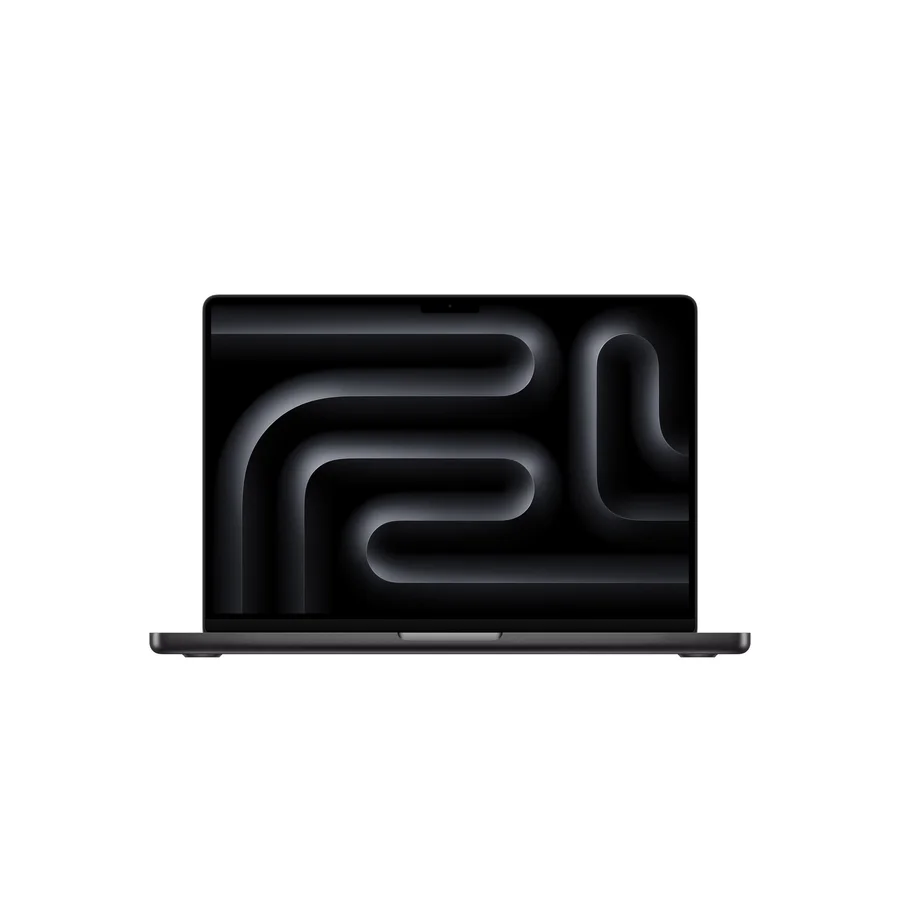
MacBook Pro 14-inch M5, 16GB/1TB, Space BlackRead the comparison9.0 /10Research-basedmore ports and an XDR displayM5: 10-core CPU, 10-core GPU
16GB memory / 1TB SSD
HDMI, SDXC and Thunderbolt 4

M5 is the chip name here; it is not an M5 Pro or M5 Max configuration. Its three USB-C ports support Thunderbolt 4. Check the exact memory, storage and display option in the selected retailer offer.

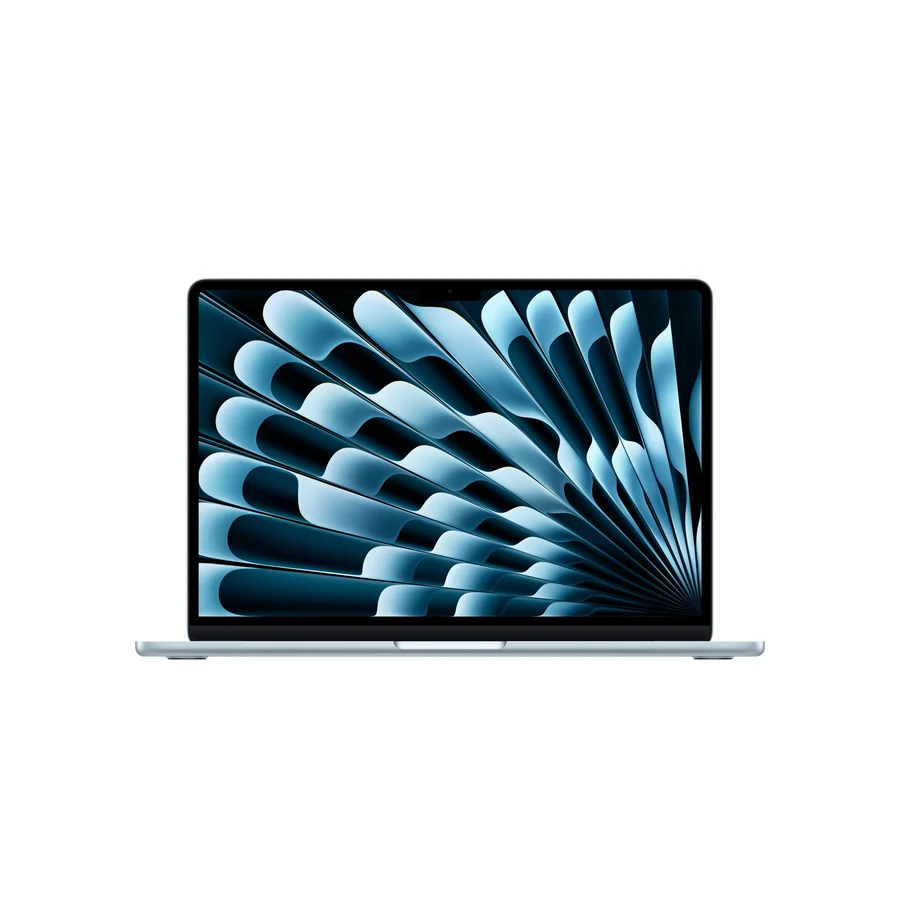
MacBook Air 13-inch M5, 16GB/512GB, Sky BlueRead the comparison9.0 /10Research-basedportable work with more memoryM5: 10-core CPU, 8-core GPU
16GB memory / 512GB SSD
Two Thunderbolt 4 ports

It has no built-in HDMI or SDXC slot. Include the adapters you need, and confirm support for any specialist software or peripherals. Memory and storage choices need to be made before purchase.

MacBook Neo A18 Pro, 8GB/256GB, Blush

EDITORIAL SCORE 8.3 /10

For everyday macOS essentials

  • A18 Pro: 6-core CPU, 5-core GPU
  • 8GB memory / 256GB SSD
  • 13-inch Liquid Retina display

The USB-C ports have different capabilities: one supports USB 3 and display output, while the other is USB 2. This 256GB configuration should not be confused with the 512GB Touch ID model.

Read the comparison

MacBook Pro 14-inch M5, 16GB/1TB, Space Black

EDITORIAL SCORE 9.0 /10

For more ports and an XDR display

  • M5: 10-core CPU, 10-core GPU
  • 16GB memory / 1TB SSD
  • HDMI, SDXC and Thunderbolt 4

M5 is the chip name here; it is not an M5 Pro or M5 Max configuration. Its three USB-C ports support Thunderbolt 4. Check the exact memory, storage and display option in the selected retailer offer.

Read the comparison

MacBook Air 13-inch M5, 16GB/512GB, Sky Blue

EDITORIAL SCORE 9.0 /10

For portable work with more memory

  • M5: 10-core CPU, 8-core GPU
  • 16GB memory / 512GB SSD
  • Two Thunderbolt 4 ports

It has no built-in HDMI or SDXC slot. Include the adapters you need, and confirm support for any specialist software or peripherals. Memory and storage choices need to be made before purchase.

Read the comparison

02 / Find your pick

What matters to you?

Choose a use case to jump to the relevant comparison. This is a navigation aid, not a personalized test result.

Blush MacBook Neo with a pink display wallpaper

MacBook Neo A18 Pro, 8GB/256GB, Blush

A 13-inch Mac with 8GB unified memory and a 256GB SSD.

See this comparison ↓

03 / A closer look

The details that make a difference.

Blush MacBook Neo with a pink display wallpaper
EDITORIAL SCORE
8.3/10
Research-based assessment

A 13-inch Mac with 8GB unified memory and a 256GB SSD. Score reflects listed strengths and trade-offs, not hands-on tests.

01 / For everyday macOS essentials

MacBook Neo A18 Pro, 8GB/256GB, Blush

A 13-inch Mac with 8GB unified memory and a 256GB SSD.

The mapped Neo uses the A18 Pro chip with a six-core CPU and five-core GPU. Its configuration suits a shortlist built around documents, browsing and video calls, provided your required apps support macOS and fit its memory and storage.

  • A18 Pro: 6-core CPU, 5-core GPU
  • 8GB memory / 256GB SSD
  • 13-inch Liquid Retina display
Before you choose

The USB-C ports have different capabilities: one supports USB 3 and display output, while the other is USB 2. This 256GB configuration should not be confused with the 512GB Touch ID model.

Check price at Walmart

Opens the linked product page. Confirm the exact model and any current purchase terms.

How we reached this verdictStrengths, caveats and our editorial score calculation8.3 /10

Research-based editorial assessment

Review verdict

MacBook Neo A18 Pro, 8GB/256GB, Blush. A 13-inch Mac with 8GB unified memory and a 256GB SSD. The mapped Neo uses the A18 Pro chip with a six-core CPU and five-core GPU. Its configuration suits a shortlist built around documents, browsing and video calls, provided your required apps support macOS and fit its memory and storage.

What to keep in mind
  • The USB-C ports have different capabilities: one supports USB 3 and display output, while the other is USB 2.
  • This 256GB configuration should not be confused with the 512GB Touch ID model.

Where it fits best

For everyday macOS essentials

The mapped Neo uses the A18 Pro chip with a six-core CPU and five-core GPU. Its configuration suits a shortlist built around documents, browsing and video calls, provided your required apps support macOS and fit its memory and storage.

Before you buy

The USB-C ports have different capabilities: one supports USB 3 and display output, while the other is USB 2. This 256GB configuration should not be confused with the 512GB Touch ID model.

Who should buy it?

Consider this product when your priority matches for everyday macos essentials and its listed features fit your setup. Compare the other options above and check the precise model, included accessories and retailer terms before ordering.

How we calculated 8.3/10

We weighted five criteria relevant to this guide. The values are editorial judgements based on the product descriptions, documented specifications and limitations. They are not independent performance measurements, laboratory test scores or customer ratings.

Listed performance & display8.1 × 30%
Workload suitability8.6 × 25%
Portability & connections8.6 × 20%
Configuration limitations7.7 × 15%
Specification confidence8.8 × 10%

Weighted editorial score: 8.3 / 10Listing research checked 3 November 2026

Space Black 14-inch MacBook Pro with a dark screen graphic
EDITORIAL SCORE
9.0/10
Research-based assessment

The base M5 chip in a 14-inch Pro, with a 1TB SSD. Score reflects listed strengths and trade-offs, not hands-on tests.

02 / For more ports and an XDR display

MacBook Pro 14-inch M5, 16GB/1TB, Space Black

The base M5 chip in a 14-inch Pro, with a 1TB SSD.

This configuration has a ten-core CPU and ten-core GPU. Apple specifies a 14.2-inch Liquid Retina XDR display with ProMotion, plus HDMI and an SDXC card slot. Those connections can be useful when a camera card or external display is part of your routine.

  • M5: 10-core CPU, 10-core GPU
  • 16GB memory / 1TB SSD
  • HDMI, SDXC and Thunderbolt 4
Before you choose

M5 is the chip name here; it is not an M5 Pro or M5 Max configuration. Its three USB-C ports support Thunderbolt 4. Check the exact memory, storage and display option in the selected retailer offer.

Check price at Walmart

Opens the linked product page. Confirm the exact model and any current purchase terms.

How we reached this verdictStrengths, caveats and our editorial score calculation9.0 /10

Research-based editorial assessment

Review verdict

MacBook Pro 14-inch M5, 16GB/1TB, Space Black. The base M5 chip in a 14-inch Pro, with a 1TB SSD. This configuration has a ten-core CPU and ten-core GPU. Apple specifies a 14.2-inch Liquid Retina XDR display with ProMotion, plus HDMI and an SDXC card slot. Those connections can be useful when a camera card or external display is part of your routine.

What to keep in mind
  • M5 is the chip name here; it is not an M5 Pro or M5 Max configuration.
  • Its three USB-C ports support Thunderbolt 4.
  • Check the exact memory, storage and display option in the selected retailer offer.

Where it fits best

For more ports and an XDR display

This configuration has a ten-core CPU and ten-core GPU. Apple specifies a 14.2-inch Liquid Retina XDR display with ProMotion, plus HDMI and an SDXC card slot. Those connections can be useful when a camera card or external display is part of your routine.

Before you buy

M5 is the chip name here; it is not an M5 Pro or M5 Max configuration. Its three USB-C ports support Thunderbolt 4. Check the exact memory, storage and display option in the selected retailer offer.

Who should buy it?

Consider this product when your priority matches for more ports and an xdr display and its listed features fit your setup. Compare the other options above and check the precise model, included accessories and retailer terms before ordering.

How we calculated 9.0/10

We weighted five criteria relevant to this guide. The values are editorial judgements based on the product descriptions, documented specifications and limitations. They are not independent performance measurements, laboratory test scores or customer ratings.

Listed performance & display9.4 × 30%
Workload suitability9.1 × 25%
Portability & connections8.7 × 20%
Configuration limitations8.5 × 15%
Specification confidence9.1 × 10%

Weighted editorial score: 9.0 / 10Listing research checked 3 November 2026

Sky Blue MacBook Air showing a blue abstract wallpaper
EDITORIAL SCORE
9.0/10
Research-based assessment

A 13.6-inch Air with a ten-core CPU and eight-core GPU. Score reflects listed strengths and trade-offs, not hands-on tests.

03 / For portable work with more memory

MacBook Air 13-inch M5, 16GB/512GB, Sky Blue

A 13.6-inch Air with a ten-core CPU and eight-core GPU.

The mapped Air has 16GB unified memory and a 512GB SSD. Apple lists two Thunderbolt 4 ports and support for up to two external displays on the M5 Air. This is a useful middle option when the Neo configuration is restrictive but you do not need the Pro display or built-in card slot.

  • M5: 10-core CPU, 8-core GPU
  • 16GB memory / 512GB SSD
  • Two Thunderbolt 4 ports
Before you choose

It has no built-in HDMI or SDXC slot. Include the adapters you need, and confirm support for any specialist software or peripherals. Memory and storage choices need to be made before purchase.

Check price at Walmart

Opens the linked product page. Confirm the exact model and any current purchase terms.

How we reached this verdictStrengths, caveats and our editorial score calculation9.0 /10

Research-based editorial assessment

Review verdict

MacBook Air 13-inch M5, 16GB/512GB, Sky Blue. A 13.6-inch Air with a ten-core CPU and eight-core GPU. The mapped Air has 16GB unified memory and a 512GB SSD. Apple lists two Thunderbolt 4 ports and support for up to two external displays on the M5 Air. This is a useful middle option when the Neo configuration is restrictive but you do not need the Pro display or built-in card slot.

What to keep in mind
  • It has no built-in HDMI or SDXC slot.
  • Include the adapters you need, and confirm support for any specialist software or peripherals.
  • Memory and storage choices need to be made before purchase.

Where it fits best

For portable work with more memory

The mapped Air has 16GB unified memory and a 512GB SSD. Apple lists two Thunderbolt 4 ports and support for up to two external displays on the M5 Air. This is a useful middle option when the Neo configuration is restrictive but you do not need the Pro display or built-in card slot.

Before you buy

It has no built-in HDMI or SDXC slot. Include the adapters you need, and confirm support for any specialist software or peripherals. Memory and storage choices need to be made before purchase.

Who should buy it?

Consider this product when your priority matches for portable work with more memory and its listed features fit your setup. Compare the other options above and check the precise model, included accessories and retailer terms before ordering.

How we calculated 9.0/10

We weighted five criteria relevant to this guide. The values are editorial judgements based on the product descriptions, documented specifications and limitations. They are not independent performance measurements, laboratory test scores or customer ratings.

Listed performance & display9.0 × 30%
Workload suitability9.2 × 25%
Portability & connections9.2 × 20%
Configuration limitations8.4 × 15%
Specification confidence9.0 × 10%

Weighted editorial score: 9.0 / 10Listing research checked 3 November 2026
04 / Buying advice

Check the details that matter.

List the apps you rely on

Confirm macOS support, plug-ins and licensing before comparing processors. A laptop that cannot run an essential application is the wrong fit regardless of its specifications.

Buy enough memory and storage

The selected configurations are 8GB/256GB, 16GB/1TB and 16GB/512GB. Allow room for your working files and applications. An external SSD adds storage but does not add unified memory.

Count the connections

Check your monitor, card reader, drives and charging arrangement. Include adapters in the price comparison, and verify the seller, condition, keyboard layout and warranty coverage.

How this comparison was put together

We reviewed the exact retailer and manufacturer pages, product identities and supplied photographs on November 3, 2026. The selections compare macbooks by use case and practical tradeoffs. Specifications are attributed listing information unless a manufacturer source is identified. We have not conducted hands-on testing. The editorial scores above are subjective, research-based assessments of listed features, suitability and limitations. unconfirmed performance, certification and medical claims are not treated as established results.

06 / FAQs

A few things worth knowing.

Is the MacBook Neo an M-series Mac?

No. This Neo uses Apple A18 Pro. Apple lists its chip, memory and port specifications. The linked configuration has 8GB memory and a 256GB SSD.

Is this MacBook Pro fitted with an M5 Pro chip?

No. It uses the base M5 chip. Apple’s 14-inch M5 specifications identify three Thunderbolt 4 ports. Specifications for M5 Pro and M5 Max models are different.

How much storage does the selected Air have?

The linked Sky Blue configuration has a 512GB SSD and 16GB unified memory. The retailer offers other configurations, so confirm both values before checkout.

Can the M5 Air connect to two monitors?

Apple specifies support for up to two external displays. Its M5 Air announcement explains the connections. Check the supported resolution, refresh rate and required cables for your displays.

Are the advertised battery hours directly comparable?

Only when the test conditions match. Video playback, web browsing and demanding applications use power differently. We have not run battery or performance tests on these laptops.

Which MacBook should I choose for photo work?

Start with your software, file sizes, storage and display needs. The Pro adds an XDR display and SDXC slot; the Air may suit a more portable setup. Neither choice guarantees a particular editing speed.

Make the choice fit your day.

Choose the exact memory, storage and connections your work needs. Then compare the selected retailer offers, including condition, accessories and warranty.

Back to the shortlist ↑