The Gadget Nerds / Make space for your controls

Gaming keyboards with a layout that fits.

Keyboard size changes the room left for your mouse and the keys available without shortcuts. These three options span tenkeyless, 60% and 75% layouts, with different switch feels and connections.

3 products comparedResearch checked November 3, 2026

Category illustration. Compare the real products below.

A note on links. Product links take you directly to Walmart. No affiliate tracking has been added to these links. Seller, price, delivery and availability can change. This guide is based on research, not hands-on testing.

01 / The shortlist

3 options. Different reasons to choose.

Start with the job you need it to do. These selections are organised by use case rather than sorted by editorial score.

Choose the Logitech G PRO for a wired TKL layout with clicky switches. Consider Huntsman Mini for a smaller 60% board with linear optical switches, or the K65 PLUS Tactile for a 75% wireless board with hot-swappable switches.

At a glance. Specifications are listing claims unless stated otherwise.
ProductEditorial scoreConsider it forKey detailsKeep in mind
Logitech G PRO mechanical TKLRead the comparison8.4 /10Research-baseda wired layout with dedicated navigation keysTenkeyless layout
GX Blue Click switches
Detachable Micro-USB cable

This is the GX Blue clicky version, not a silent or wireless G PRO model. Consider the sound in shared rooms. The detachable connector is Micro-USB rather than USB-C.

Razer Huntsman Mini Special EditionRead the comparison8.4 /10Research-baseda compact 60% wired setup60% / 61-key layout
Linear optical switches
Detachable USB-C cable

There is no dedicated function row or arrow-key cluster. This is the linear optical variant; do not substitute the clicky model’s characteristics. Confirm software support for lighting and remapping on your computer.

Corsair K65 PLUS WIRELESS TactileRead the comparison8.8 /10Research-basedwireless use with arrows and a function row75% layout
MLX Fusion tactile switches
2.4GHz, Bluetooth and USB

The mapped switches are MLX Fusion tactile, not the MLX Red linear switches in another K65 PLUS version. Check replacement-switch compatibility, keyboard layout and which settings require iCUE.

Logitech G PRO mechanical TKL

EDITORIAL SCORE 8.4 /10

For a wired layout with dedicated navigation keys

  • Tenkeyless layout
  • GX Blue Click switches
  • Detachable Micro-USB cable

This is the GX Blue clicky version, not a silent or wireless G PRO model. Consider the sound in shared rooms. The detachable connector is Micro-USB rather than USB-C.

Read the comparison

Razer Huntsman Mini Special Edition

EDITORIAL SCORE 8.4 /10

For a compact 60% wired setup

  • 60% / 61-key layout
  • Linear optical switches
  • Detachable USB-C cable

There is no dedicated function row or arrow-key cluster. This is the linear optical variant; do not substitute the clicky model’s characteristics. Confirm software support for lighting and remapping on your computer.

Read the comparison

Corsair K65 PLUS WIRELESS Tactile

EDITORIAL SCORE 8.8 /10

For wireless use with arrows and a function row

  • 75% layout
  • MLX Fusion tactile switches
  • 2.4GHz, Bluetooth and USB

The mapped switches are MLX Fusion tactile, not the MLX Red linear switches in another K65 PLUS version. Check replacement-switch compatibility, keyboard layout and which settings require iCUE.

Read the comparison

02 / Find your pick

What matters to you?

Choose a use case to jump to the relevant comparison. This is a navigation aid, not a personalized test result.

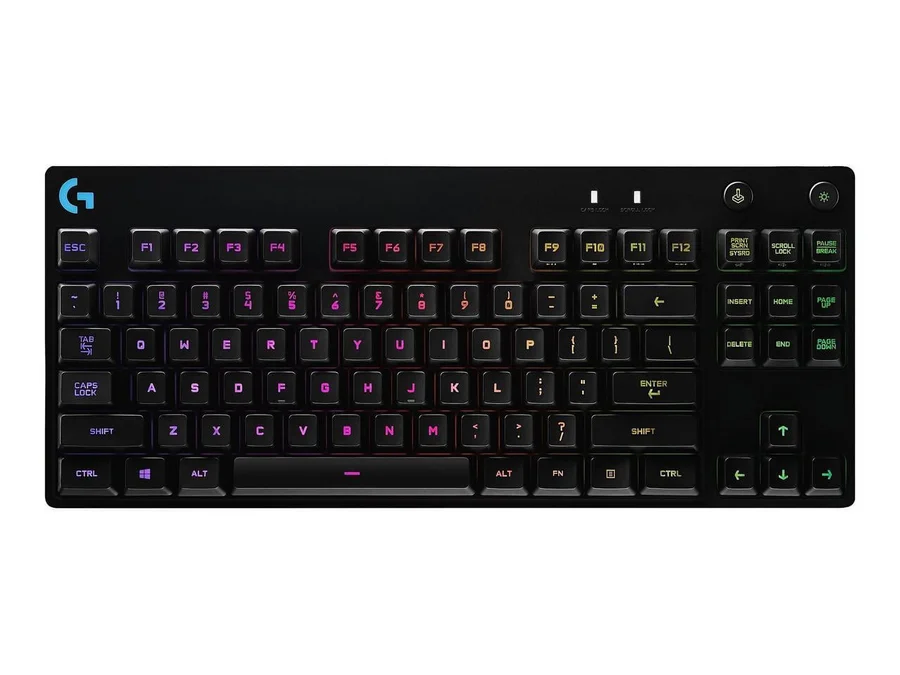
Black Logitech G PRO tenkeyless RGB keyboard

Logitech G PRO mechanical TKL

A tenkeyless keyboard with GX Blue Click switches.

See this comparison ↓

03 / A closer look

The details that make a difference.

Black Logitech G PRO tenkeyless RGB keyboard
EDITORIAL SCORE
8.4/10
Research-based assessment

A tenkeyless keyboard with GX Blue Click switches. Score reflects listed strengths and trade-offs, not hands-on tests.

01 / For a wired layout with dedicated navigation keys

Logitech G PRO mechanical TKL

A tenkeyless keyboard with GX Blue Click switches.

The mapped G PRO removes the number pad while keeping a function row and navigation cluster. Its detachable Micro-USB cable is useful for packing, and LIGHTSYNC RGB settings are managed through supported Logitech software.

  • Tenkeyless layout
  • GX Blue Click switches
  • Detachable Micro-USB cable
Before you choose

This is the GX Blue clicky version, not a silent or wireless G PRO model. Consider the sound in shared rooms. The detachable connector is Micro-USB rather than USB-C.

Check price at Walmart

Opens the linked product page. Confirm the exact model and any current purchase terms.

How we reached this verdictStrengths, caveats and our editorial score calculation8.4 /10

Research-based editorial assessment

Review verdict

Logitech G PRO mechanical TKL. A tenkeyless keyboard with GX Blue Click switches. The mapped G PRO removes the number pad while keeping a function row and navigation cluster. Its detachable Micro-USB cable is useful for packing, and LIGHTSYNC RGB settings are managed through supported Logitech software.

What to keep in mind
  • This is the GX Blue clicky version, not a silent or wireless G PRO model.
  • Consider the sound in shared rooms.
  • The detachable connector is Micro-USB rather than USB-C.

Where it fits best

For a wired layout with dedicated navigation keys

The mapped G PRO removes the number pad while keeping a function row and navigation cluster. Its detachable Micro-USB cable is useful for packing, and LIGHTSYNC RGB settings are managed through supported Logitech software.

Before you buy

This is the GX Blue clicky version, not a silent or wireless G PRO model. Consider the sound in shared rooms. The detachable connector is Micro-USB rather than USB-C.

Who should buy it?

Consider this product when your priority matches for a wired layout with dedicated navigation keys and its listed features fit your setup. Compare the other options above and check the precise model, included accessories and retailer terms before ordering.

How we calculated 8.4/10

We weighted five criteria relevant to this guide. The values are editorial judgements based on the product descriptions, documented specifications and limitations. They are not independent performance measurements, laboratory test scores or customer ratings.

Switch & layout features8.6 × 30%
Gaming/work fit8.8 × 25%
Connection & controls8.0 × 20%
Layout/software caveats7.8 × 15%
Variant confidence8.4 × 10%

Weighted editorial score: 8.4 / 10Listing research checked 3 November 2026

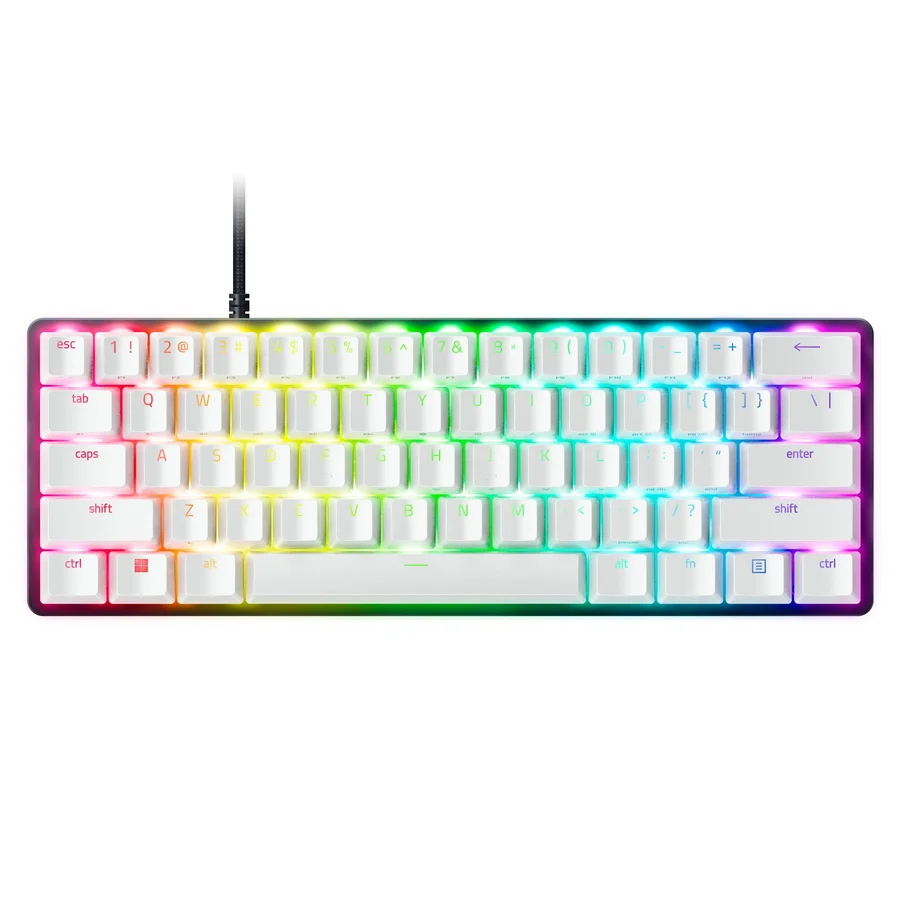
White-key Razer Huntsman Mini Special Edition with colored backlighting
EDITORIAL SCORE
8.4/10
Research-based assessment

Linear optical switches in a black-and-white keyboard. Score reflects listed strengths and trade-offs, not hands-on tests.

02 / For a compact 60% wired setup

Razer Huntsman Mini Special Edition

Linear optical switches in a black-and-white keyboard.

The selected Special Edition uses a 60% layout and a detachable USB-C cable. Its compact footprint leaves more desk space beside the keyboard. Secondary functions are accessed through key combinations, which matters if the board will also serve for writing or work.

  • 60% / 61-key layout
  • Linear optical switches
  • Detachable USB-C cable
Before you choose

There is no dedicated function row or arrow-key cluster. This is the linear optical variant; do not substitute the clicky model’s characteristics. Confirm software support for lighting and remapping on your computer.

Check price at Walmart

Opens the linked product page. Confirm the exact model and any current purchase terms.

How we reached this verdictStrengths, caveats and our editorial score calculation8.4 /10

Research-based editorial assessment

Review verdict

Razer Huntsman Mini Special Edition. Linear optical switches in a black-and-white keyboard. The selected Special Edition uses a 60% layout and a detachable USB-C cable. Its compact footprint leaves more desk space beside the keyboard. Secondary functions are accessed through key combinations, which matters if the board will also serve for writing or work.

What to keep in mind
  • There is no dedicated function row or arrow-key cluster.
  • This is the linear optical variant; do not substitute the clicky model’s characteristics.
  • Confirm software support for lighting and remapping on your computer.

Where it fits best

For a compact 60% wired setup

The selected Special Edition uses a 60% layout and a detachable USB-C cable. Its compact footprint leaves more desk space beside the keyboard. Secondary functions are accessed through key combinations, which matters if the board will also serve for writing or work.

Before you buy

There is no dedicated function row or arrow-key cluster. This is the linear optical variant; do not substitute the clicky model’s characteristics. Confirm software support for lighting and remapping on your computer.

Who should buy it?

Consider this product when your priority matches for a compact 60% wired setup and its listed features fit your setup. Compare the other options above and check the precise model, included accessories and retailer terms before ordering.

How we calculated 8.4/10

We weighted five criteria relevant to this guide. The values are editorial judgements based on the product descriptions, documented specifications and limitations. They are not independent performance measurements, laboratory test scores or customer ratings.

Switch & layout features8.9 × 30%
Gaming/work fit8.5 × 25%
Connection & controls8.4 × 20%
Layout/software caveats7.4 × 15%
Variant confidence8.4 × 10%

Weighted editorial score: 8.4 / 10Listing research checked 3 November 2026
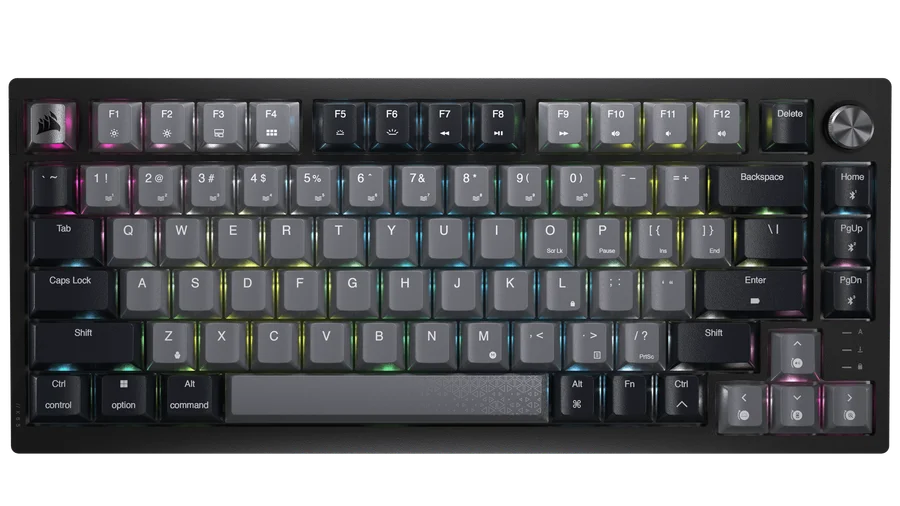
Black Corsair K65 PLUS WIRELESS Tactile keyboard with top-right dial
EDITORIAL SCORE
8.8/10
Research-based assessment

A 75% hot-swappable board with MLX Fusion tactile switches. Score reflects listed strengths and trade-offs, not hands-on tests.

03 / For wireless use with arrows and a function row

Corsair K65 PLUS WIRELESS Tactile

A 75% hot-swappable board with MLX Fusion tactile switches.

The black Tactile edition supports 2.4GHz wireless, Bluetooth and USB wired operation. It keeps arrow keys and a function row in a more compact arrangement than a full-size keyboard. Compatible hot-swappable switches provide scope to change the feel later.

  • 75% layout
  • MLX Fusion tactile switches
  • 2.4GHz, Bluetooth and USB
Before you choose

The mapped switches are MLX Fusion tactile, not the MLX Red linear switches in another K65 PLUS version. Check replacement-switch compatibility, keyboard layout and which settings require iCUE.

Check price at Walmart

Opens the linked product page. Confirm the exact model and any current purchase terms.

How we reached this verdictStrengths, caveats and our editorial score calculation8.8 /10

Research-based editorial assessment

Review verdict

Corsair K65 PLUS WIRELESS Tactile. A 75% hot-swappable board with MLX Fusion tactile switches. The black Tactile edition supports 2.4GHz wireless, Bluetooth and USB wired operation. It keeps arrow keys and a function row in a more compact arrangement than a full-size keyboard. Compatible hot-swappable switches provide scope to change the feel later.

What to keep in mind
  • The mapped switches are MLX Fusion tactile, not the MLX Red linear switches in another K65 PLUS version.
  • Check replacement-switch compatibility, keyboard layout and which settings require iCUE.

Where it fits best

For wireless use with arrows and a function row

The black Tactile edition supports 2.4GHz wireless, Bluetooth and USB wired operation. It keeps arrow keys and a function row in a more compact arrangement than a full-size keyboard. Compatible hot-swappable switches provide scope to change the feel later.

Before you buy

The mapped switches are MLX Fusion tactile, not the MLX Red linear switches in another K65 PLUS version. Check replacement-switch compatibility, keyboard layout and which settings require iCUE.

Who should buy it?

Consider this product when your priority matches for wireless use with arrows and a function row and its listed features fit your setup. Compare the other options above and check the precise model, included accessories and retailer terms before ordering.

How we calculated 8.8/10

We weighted five criteria relevant to this guide. The values are editorial judgements based on the product descriptions, documented specifications and limitations. They are not independent performance measurements, laboratory test scores or customer ratings.

Switch & layout features9.1 × 30%
Gaming/work fit9.1 × 25%
Connection & controls9.0 × 20%
Layout/software caveats7.8 × 15%
Variant confidence8.7 × 10%

Weighted editorial score: 8.8 / 10Listing research checked 3 November 2026
04 / Buying advice

Check the details that matter.

Count the keys you use

A 60% board saves space but moves more actions to shortcuts. TKL retains a separate navigation area; 75% compresses the layout while keeping arrows and a function row.

Choose switch feel deliberately

Clicky, tactile and linear describe different feedback. Sound also depends on the case, caps, desk and typing force. If possible, try similar switches before committing.

Check the whole connection setup

Confirm the keyboard layout, receiver, cable and operating-system support. Wireless modes can have different battery and feature behavior, while remapping may need manufacturer software.

How this comparison was put together

We reviewed the exact retailer and manufacturer pages, product identities and supplied photographs on November 3, 2026. The selections compare gaming keyboards by use case and practical tradeoffs. Specifications are attributed listing information unless a manufacturer source is identified. We have not conducted hands-on testing. The editorial scores above are subjective, research-based assessments of listed features, suitability and limitations. unconfirmed performance, certification and medical claims are not treated as established results.

06 / FAQs

A few things worth knowing.

What is a tenkeyless keyboard?

A TKL keyboard omits the number pad while normally retaining a function row, arrow keys and navigation cluster. The Logitech G PRO is the TKL option here.

Does the Huntsman Mini have dedicated arrow keys?

No. Its 60% layout uses secondary functions for arrows and other omitted keys. Check that arrangement against the shortcuts you use outside games.

Which K65 PLUS switch variant is linked?

The black Tactile edition with MLX Fusion switches. Corsair identifies this exact tactile version. Other K65 PLUS editions have different switches.

Does hot-swappable mean every switch will fit?

No. Check the PCB, switch type and manufacturer compatibility guidance. Hot-swap support does not make optical and conventional mechanical switches interchangeable.

Are optical switches always faster in games?

The switch mechanism alone does not establish overall latency or an advantage in a particular game. We have not measured input delay on these keyboards.

Which is the quietest option?

We have not measured noise. GX Blue Click switches intentionally add an audible click; the other two have different feedback, but neither is guaranteed silent. Desk surface and typing style also matter.

Make the choice fit your day.

Pick a layout you can use comfortably for both games and everyday tasks. Then confirm the exact switch version and connection modes before ordering.

Back to the shortlist ↑